Learning Series - Day 1 What happens when i type my password in windows login screen
Folks hope everyone is doing good , As part of my day to day learning i decided to document the things and understanding which i came across , Among that today i am going to share the thread which i came across to share up.
Everyone daily logging in to windows and not sure what we are doing up or what happens in background process right , Inorder to understand that first we need to categorize the things into types or scenarios .
1)Single User/Multi User Computer with password as authorization - Not Connected to domain
2)Multi User Computer with password -Not Connected to domain
3)Multi user computer which was connected to Active directory
4)Windows login with fido,photo login etc.
in short Microsoft defines the login as interactive, smart,network,biometric logon. Today i came across a intresting thread which i m sharing it here :
Before jumping into thread you need to understand the windows login architecture :
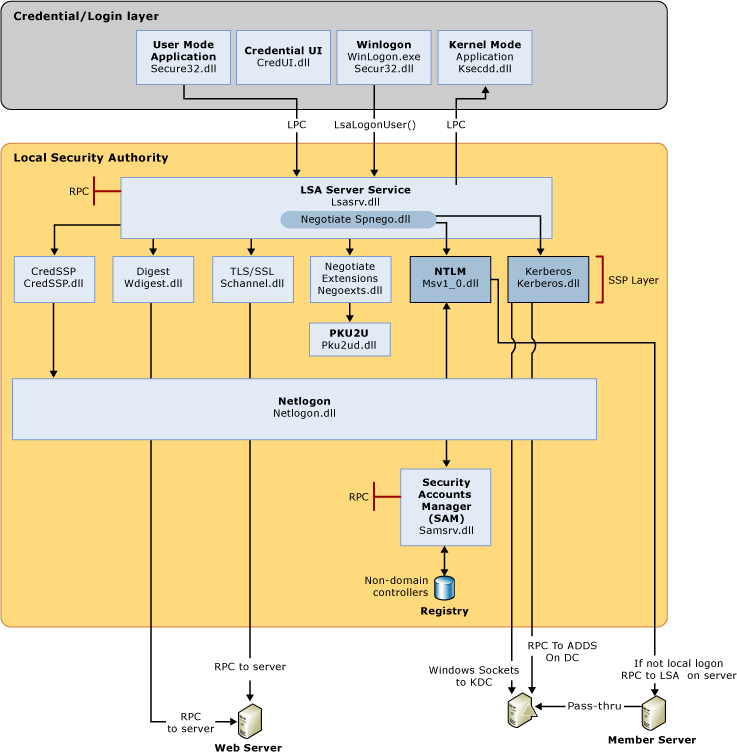
Authentication components for all systems
.gif)
First things first. Windows needs to know how it'll accept your creds. It uses Credential Providers for this. They are the thing that ferries your human-entered credentials into LSA. All they do is take keystrokes and convert them to data structures LSA understands.
Windows has a list of maybe 2 dozen credential providers to do various tasks, like take your password, handle your smart card, scan your fingerprint, etc. Windows knows what credentials are supported on this machine, so it enumerates them and shows them.
Now we're in LSA, and LSA has a list of these things called authentication packages. There's only a handful of them. Maybe you've heard of them: negotiate, Kerberos, msv1_0, etc. Well, LSA itself doesn't really know what any of these do so it just loops through all of them.
LSA asks each package "hey can you deal with these credentials??". Some packages say "pfft, no." Others say "why yes, yes I can". One of these, msv1_0, chimes in and says it'll give it a try, and takes the password and runs it through a KDF (pbkdf2).
Well, it turns out cached logon always happens first. You're at the desktop and LSA moves on to the next package: Kerberos. Kerberos uses the password to do an AS-REQ to Active Directory and gets a TGT. That TGT gets cached in-memory. It doesn't get stored in the SAM.
At this point you're at the desktop, you now have a TGT and can run around the network, but how exactly did the local computer know anything about you, like your name, your groups, any of that? The TGT is encrypted where the client can't ever read any contents, so what gives?
Well LSA knows that password so it decrypts the ticket! Within that ticket is your PAC -- Privilege Attribute Certificate -- yeah, silly name. It contains all your user details including your display name and group memberships.
BUT how can you access all your local files and stuff if you don't get your PAC until after you've hit the desktop? Well, it turns out some details get cached with your password verifier in the SAM and they're used until AD can tell you otherwise.
That's why you don't need line of sight to a DC to access your stuff while out on the road for instance.
What if your password changes or your account has been disabled? Nothing changes. You get to the desktop, and then the AS-REQ fails. Windows recognizes the error if disabled starts flagging the account so the cache will fail the next time around.
If it's just a blip or your password requires changing you'll get the "Windows requires your credentials" notification that asks you to lock and unlock. That way it can kick off the flow again. But what about that notification "your password is going to expire in 5 days"?
...the notification that everyone, myself included, ignores. Well, your PAC includes this information and once Windows reads the PAC and recognizes its nearing <5 days it'll prompt. Incidentally this is why it takes a moment after logon to see the prompt.
Okay, great, I'm not using a password. I'm using Windows Hello. How does that work? Well, you do the cred prov thing and you pick your face. The cred prov invokes the magic sauce that scans your face and gets a template. It looks up your Windows Hello keys on disk and...
Asks the TPM to decrypt them using the template plus additional information as the key and entropy. The key is then converted into one of those structs and is sent off to LSA and LSA begins its dance again.
LSA loops through everything and hits the cache verifier, does it's thing, and is now at the desktop. From there it invokes our friend Kerberos, but this time does PKINIT, and away we go:
Maybe lets dig into that a bit: PKINIT. It's almost a four letter word. How do you make a symmetric crypto protocol work with asymmetric keys? Well, first the client generates a Diffie-Hellman key pair and signs the public key using the client certificate private key.
The client fires that message (plug other goo) off to the KDC and the KDC checks the certificate to see if it matches anyone on file in the directory. Suppose it does, and it generates a TGT. The KDC then generates its own Diffie-Hellman key pair, and signs it with the KDC cert.
Okay okay, what about Credential Guard? How does that fit into this madness? Well, we have to go back to when LSA is receiving those creds from the cred prov. LSA has a special channel (well, RPC, it's always some form of RPC) to the secure world LsaIso process.
And then LSA asks Cred Guard to decrypt the AS-REP response. Cred Guard then knows the TGT session key is super special so it protects it in such a way that only it can decrypt. Then whenever Kerberos needs the session key it asks Cred Guard.
This basically works like an oracle. Cred Guard returns an opaque blob to LSA. Later LSA asks Cred Guard to decrypt something so LSA hands it the opaque blob and the thing to decrypt. Cred Guard decrypts the opaque blob, then using the key in that blob, decrypts the thing.
And of course, we already did FIDO the other day.
Inshort the following mindmap will help to learn up the entire process :

References : https://docs.microsoft.com/en-us/windows-server/security/windows-authentication/windows-logon-scenarios
https://twitter.com/SteveSyfuhs/status/1297957799079510018

Comments
Post a Comment